
Applying for jobs as a student or fresh graduate is honestly exhausting. You spend hours editing one resume, then someone tells you it’s not ATS-friendly. You try writing a cover letter, but it sounds too formal, too boring, or too “copied.”
That’s why are becoming so popular in 2026. They help you write faster, organize your experience better, and create clean documents without paying or entering any card details.
I tested most of the tools in this guide using real student situations: internship applications, first-time CVs, and entry-level jobs. Some tools were surprisingly helpful, while others looked free but quickly pushed me toward paid plans. Many students prefer free AI tools for resume and cover letter writing without credit card because paid resume builders often lock downloads behind payment.
This article will save you time by showing only the tools that are actually usable without a credit card.
Why Students and Fresh Graduates Need Free AI Tools for Resume and Cover Letter Writing Without Credit Card
If you’re a student, the hardest part is usually not the resume template. It’s the writing.
Most students struggle with:
No experience
You may have no job history, but you still have skills, projects, coursework, volunteering, or internships. Most people don’t know how to write those properly.
ATS issues
Many companies use ATS (Applicant Tracking Systems). If your resume formatting is messy or you don’t use the right keywords, your resume may never reach a human.
Low writing confidence
A lot of students can do the work, but can’t “sell themselves” in a professional way.
Expensive resume builders
Most resume websites look free until the final step. Then they ask for payment or a card.
Credit card wall
Even “free trials” often require a credit card. That’s a problem for younger students, international students, and anyone who doesn’t want to risk subscriptions.
That’s where these free tools help. They don’t magically get you hired, but they make your resume and cover letter look more professional and readable. Below are the most useful free AI tools for resume and cover letter writing without credit card that I tested for internships and entry-level jobs.
Best Free AI Tools for Resume and Cover Letter Writing Without Credit Card (2026)
Below are the best tools you can realistically use without entering payment details. I’ll be honest about what’s truly free and what’s limited. In this guide, I’m sharing the most practical free AI tools for resume and cover letter writing without credit card that students can use immediately.
1) ChatGPT
What it is:
ChatGPT is a conversational AI tool that helps you write, rewrite, and improve text.
How students use it for resumes:
Students use it to:
- rewrite bullet points professionally
- generate resume summaries
- create internship cover letters
- tailor resumes for job descriptions
Realistic example:
A university student applying for a marketing internship pastes their experience:
“Managed Instagram page for society, made posters, helped in event.”
ChatGPT rewrites it into:
“Managed the society’s Instagram page, creating weekly content and promotional posters that improved event engagement.”
Key free features:
- Bullet point rewriting
- Resume summary generation
- Cover letter drafting
- Tailoring for job descriptions
- Works well for internship applications
Free limitations:
The free version has daily message limits. Also, it can sometimes write things too “perfect” and generic unless you guide it properly.
Best use case:
Writing and improving resume bullet points + generating cover letters quickly.
Official link: ChatGPT
2) Google Gemini
What it is:
Google Gemini is Google’s AI assistant. It’s strong for structured writing and job-focused rewriting.
How students use it for resumes:
Gemini is useful for:
- rewriting resumes in a more ATS-friendly style
- extracting keywords from job descriptions
- creating cover letter versions for different companies
Realistic example:
A student applying for a customer support role pastes a job ad. Gemini extracts the key skills:
- communication
- problem-solving
- ticket handling
- empathy
- CRM familiarity
Then it helps adjust resume bullet points to match those keywords.
Key free features:
- Job description keyword extraction
- Resume bullet improvement
- Cover letter drafting
- Clear writing style (less “fluffy”)
Free limitations:
Some advanced features have usage limits. But for resumes, the free tier is more than enough.
Best use case:
ATS keyword matching + cleaner resume writing.
Official link: Gemini
3) Canva Resume Builder (Free Plan)
What it is:
Canva is a design platform with free resume templates.
How students use it:
Canva is mainly used for:
- creating visually clean resumes
- making one-page student CVs
- designing internship resumes that look modern
Realistic example:
A student applying for a graphic design internship uses Canva to create a simple resume with:
- portfolio link
- skills section
- clean layout
- matching colors
Key free features:
- Hundreds of free resume templates
- Easy drag-and-drop editing
- Export as PDF
- Great for creative resumes
Free limitations:
Some templates are Pro-only. Also, Canva resumes can become ATS-unfriendly if you use too many icons or text boxes.
Best use case:
Design-focused resumes (creative fields, internships, portfolios).
Official link: Canva Resume Builder
4) Kickresume (Free Tier)
What it is:
Kickresume is a resume builder that offers AI help and templates.
How students use it:
Students use Kickresume for:
- quick resume creation
- writing bullet points with AI suggestions
- cover letter structure
Realistic example:
A student with no work experience uses Kickresume to build a resume using:
- education
- projects
- certifications
- volunteering
The tool helps format it cleanly.
Key free features:
- Resume templates
- Basic resume builder
- Some AI suggestions
- Cover letter builder (limited)
Free limitations (important):
Many AI features are limited. Some exports may require upgrading depending on template.
Best use case:
Students who want a ready-made resume layout quickly.
Official link: Kickresume
5) Resume.io (Free Tier)
What it is:
Resume.io is one of the most popular resume builders online.
How students use it:
Students use it for:
- fast resume creation
- clean formatting
- simple one-page resumes
Realistic example:
A fresh graduate creates a resume for a junior data analyst role. Resume.io helps structure:
- projects
- tools (Excel, SQL, Power BI)
- internship experience
Key free features:
- Simple resume builder
- ATS-friendly layout options
- Easy editing
- Cover letter tool available
Free limitations:
Some downloads are restricted on free tier. Many templates are locked.
Best use case:
Basic professional resumes with clean formatting.
Official link: Resume.io
6) Zety (Trial Limitations)
What it is:
Zety is a premium resume builder known for strong templates and step-by-step guidance.
How students use it:
Many students use it to:
- create resume drafts
- see what a professional layout looks like
- build a cover letter structure
Realistic example:
A student builds a resume in Zety and uses the text content elsewhere (like in Google Docs), because exporting usually requires payment.
Key free features:
- Resume building guidance
- Cover letter builder
- Step-by-step suggestions
Free limitations (important):
Zety is not fully free. You can build resumes, but downloading/exporting often requires payment.
Best use case:
Drafting resume content and structure (not for free PDF export).
Official link: Zety
7) Grammarly (Free Tier)
What it is:
Grammarly is a writing assistant that improves grammar, clarity, and tone.
How students use it:
Students use Grammarly for:
- cleaning up resume language
- fixing awkward sentences
- making cover letters sound confident
- removing repeated words
Realistic example:
A student writes:
“I am hardworking and passionate and I want to learn.”
Grammarly doesn’t rewrite everything, but it helps you fix tone and clarity. You can then rewrite it yourself into something stronger.
Key free features:
- Grammar + spelling fixes
- Basic clarity suggestions
- Tone hints
- Works in browser and Google Docs
Free limitations:
Advanced rewrites are limited. No plagiarism checker in free version.
Best use case:
Final polishing of resume and cover letter.
Official link: Grammarly
8) Teal HQ Resume Builder (Free Plan)
What it is:
Teal is one of the best tools for tailoring resumes for job applications.
How students use it:
Teal is used for:
- tracking job applications
- tailoring resumes to job descriptions
- managing multiple resume versions
- improving ATS keyword matching
Realistic example:
When I tested Teal, I noticed it was one of the few tools that actually made tailoring easy. You paste the job description, and it shows which keywords your resume is missing.
For internship seekers applying to 20+ roles, this is a big advantage.
Key free features:
- Resume builder
- Job tracking
- Keyword matching
- Multiple versions of resume
Free limitations:
Some advanced scoring features are limited, but the free plan is still useful.
Best use case:
ATS-focused resumes + applying to many internships/jobs.
Official link: Teal HQ Resume Builder

Comparison Table
| Tool | Best For | Resume Templates | Cover Letter Help | ATS-Friendly? | Free Limit Notes |
|---|---|---|---|---|---|
| ChatGPT | Writing bullet points + letters | No | Yes | Medium | Free daily message limits |
| Google Gemini | Keyword matching + clean writing | No | Yes | High | Free tier is enough for resumes |
| Canva | Design resumes | Yes | Limited | Medium | Some templates Pro-only |
| Kickresume | Quick resume building | Yes | Limited | Medium | AI + export limits on free tier |
| Resume.io | Simple professional resumes | Yes | Yes | High | Many templates/downloads locked |
| Zety | Resume structure guidance | Yes | Yes | High | Export usually paid |
| Grammarly | Polishing + grammar | No | Yes (editing) | N/A | Advanced rewrites limited |
| Teal HQ | ATS tailoring + tracking | Limited | No | Very High | Some advanced features paid |
How to Write a Strong Resume Using AI (Without Lying)
AI is powerful, but it can also ruin your resume if you let it invent things. The best way to use it is like a writing coach. If you use free AI tools for resume and cover letter writing without credit card, always rewrite the final version in your own words and keep it honest.
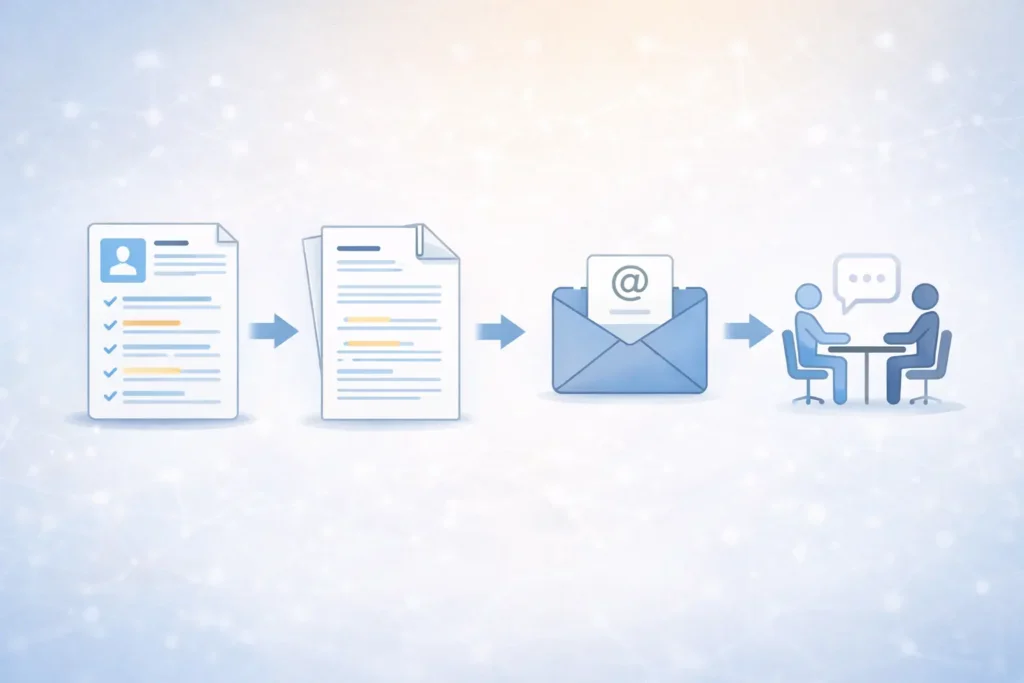
Here’s a simple 6-step method that works.
Step 1: Choose your target role
Don’t write one resume for everything. Pick one:
- internship
- entry-level job
- part-time job
- freelance role
Step 2: Collect achievements (even small ones)
Students underestimate what counts:
- university projects
- presentations
- group leadership
- freelancing work
- volunteering
- certifications
Step 3: Build an ATS-friendly resume layout
Use Teal, Resume.io, or a clean Google Docs format.
Avoid:
- tables
- icons everywhere
- too many columns
Step 4: Improve wording (make it professional)
Use ChatGPT or Gemini to rewrite bullet points.
But always keep it true.
Step 5: Generate a cover letter draft
Use AI to create a structure:
- intro
- why this role
- why you
- short closing
Then rewrite it in your own voice.
Step 6: Final review + export PDF
Run it through Grammarly. Export as PDF and check formatting on mobile.
Common Mistakes Students Make When Using AI Resume Tools
These mistakes are extremely common, and they cost interviews.
Copying AI blindly
AI often writes generic lines like “highly motivated individual.” Recruiters hate this.
Adding fake skills
Don’t claim tools you can’t use. If the interview asks, you’ll be stuck.
Making the resume too long
Most student resumes should be one page.
Sending the same cover letter everywhere
AI makes it easy to customize. Do it. Even 5 minutes of editing helps.
Ignoring ATS keywords
If the job says “customer support” and your resume says “client help,” you may lose matching points.
FAQs
Are free AI tools for resume and cover letter writing without credit card safe?
Yes, most of the tools in this guide are safe. Just avoid pasting sensitive personal data like your full address, ID numbers, or private documents.
Can AI make my resume ATS-friendly?
Yes. Tools like Teal and Resume.io are especially helpful for ATS formatting and keyword matching. ChatGPT and Gemini can also help rewrite bullet points in an ATS-friendly way.
Which tool is best for internship resumes?
For most students, the best combo is:
- ChatGPT (writing)
- Teal (ATS + tailoring)
- Canva (if you want design)
Is Canva good for ATS resumes?
It can be, but only if you use a simple layout. Avoid heavy graphics, icons, and multiple columns.
What is the best free AI tool overall?
If you want one tool to start with, use ChatGPT for writing and Teal for ATS tailoring.
Are free AI tools for resume and cover letter writing without credit card good enough for job applications?
Yes, for most students these free AI tools for resume and cover letter writing without credit card are more than enough if you keep the content honest and tailored.
Conclusion
If you’re applying for internships or entry-level jobs in 2026, you don’t need expensive subscriptions to create a strong resume. You just need the right workflow and a few tools that actually work.
The best part is that free AI tools for resume and cover letter writing without credit card can help you write better, tailor faster, and apply with more confidence—without paying upfront. Overall, these free AI tools for resume and cover letter writing without credit card are enough for most students to apply confidently in 2026.
My quick recommendation:
- Best overall for writing: ChatGPT
- Best for ATS + tailoring: Teal HQ
- Best for design: Canva
Also, if you’re using AI for other parts of student life, you can check our related guides: