Introduction
When I first started exploring artificial intelligence, I honestly had no idea where to begin. The tutorials looked complicated, the terminology felt heavy, and I assumed AI was only for developers and data scientists.
But then I discovered something that changed everything. There are free AI tools for beginners to learn AI skills faster — and most of them require absolutely zero coding experience.
You do not need a degree. You do not need to understand algorithms or neural networks. You just need the right tools, a willingness to practice, and a clear direction. In 2026, the best free AI tools for beginners to learn AI skills faster are more powerful and more accessible than ever before.
This complete guide will show you exactly which tools to use, how to use them, and the step-by-step process to go from total beginner to confident AI user — all without spending a single dollar.
Why You Should Use Free AI Tools to Learn AI Skills Faster
A lot of beginners think learning AI means sitting through long university courses or memorizing difficult math formulas. That used to be true. It is not anymore.

The fastest way to build real AI knowledge today is by actually using AI tools in daily practice. When you interact with these tools regularly, you naturally start to understand how they work, how to guide them, and how to apply them to real tasks.
Free AI tools for beginners to learn AI skills faster offer several genuine advantages that no textbook can match:
- No coding required — most tools use simple chat or drag-and-drop interfaces
- You learn by doing, which builds practical skills far quicker than passive study
- Free plans provide enough features to grow from beginner to intermediate level
- You can experiment freely without any financial risk
- Real-world application means you build an actual portfolio while you learn
One thing I noticed early in my learning journey is that people who use tools daily progress much faster than those who only watch tutorial videos. Watching is passive. Using a tool is active. And active learning is what actually sticks.
Whether your goal is smarter research, better writing, creative design, or building automated workflows, there is a free AI tool built for exactly that purpose. You can also explore free AI tools for content creation to practice your skills on real projects from day one.
For deeper reading on how AI is reshaping learning and digital skills, check out resources from Neil Patel’s blog at https://neilpatel.com/blog and HubSpot’s marketing blog at https://blog.hubspot.com — both are excellent starting points for beginners.
Free AI Tools for Beginners to Learn AI Skills Faster (Complete Guide)
This is the core section of this guide. Below are seven carefully selected tools that are genuinely beginner-friendly, available on free plans, and proven to help you build real AI skills as quickly as possible.
These are not the generic names you see repeated everywhere. These are tools that teach you how to think with AI — not just use it.
1. Perplexity AI
What it is: Perplexity AI is a research-focused AI tool that answers your questions using real-time web sources. Think of it as a smarter, more honest search engine that explains things in plain, easy language.
How it works: You type a question, and Perplexity searches the web, reads multiple sources, and delivers a clear, cited answer. It is perfect for beginners who want to understand AI topics quickly without drowning in technical jargon.
Real-life example: When I was trying to understand what machine learning actually means in simple terms, I asked Perplexity. It gave me a well-explained answer with sources I could explore further. That one session saved me hours of confusing Googling.
Features:
- Real-time web search with properly cited sources
- Follow-up question capability for deeper exploration
- Clean, distraction-free interface
- Works without creating an account
Free limitations: Free plan includes basic searches with a daily limit on Pro searches.
Best use case: Research, learning new AI concepts quickly, and verifying information before writing.
Official website
2. Claude AI
What it is: Claude AI is a long-form AI assistant built by Anthropic. It is widely recognized for producing clear, thoughtful, and well-structured explanations — which makes it one of the best free AI tools for beginners to learn AI skills faster through conversation.
How it works: You have a natural conversation with Claude, ask it to explain topics, summarize documents, help you write, or walk you through ideas step by step. Claude handles long, detailed answers better than most other AI tools.
Real-life example: I asked Claude to explain the difference between AI, machine learning, and deep learning in simple terms. The response was so clear and organized that I felt confident explaining those same concepts to someone else the very next day.
Features:
- Excellent at long-form explanations and summaries
- Great for learning by asking layered follow-up questions
- Can help analyze documents and assist with writing
- Conversational tone that feels natural and approachable
Free limitations: Free tier has a daily message limit.
Best use case: Understanding complex AI concepts, document analysis, and writing assistance.
Official website
3. Gamma AI
What it is: Gamma AI is an AI-powered presentation and document creation tool. You describe what you need, and it builds a polished, professional presentation within seconds.
How it works: You enter a topic or paste your existing text, choose a visual style, and Gamma automatically generates a complete presentation with slides, headings, images, and clean formatting.
Real-life example: I used Gamma to create a presentation on AI tools for a small online course I was developing. What would have taken three hours in PowerPoint took about fifteen minutes with Gamma — and the result looked far better.
Features:
- AI-generated slides from a simple text prompt
- Customizable templates and visual themes
- Support for embeds, images, and video
- Easy sharing and export options
Free limitations: Free plan includes a limited number of AI-generated presentations per month.
Best use case: Learning to create professional content with AI and sharing your knowledge visually.
Official website
4. Tome AI
What it is: Tome AI is a visual storytelling and presentation tool that combines AI-generated layouts with narrative structure. It is ideal for students and beginners who want to present ideas in a creative, modern format.
How it works: You describe your topic or idea, and Tome generates a visual, scroll-based document that blends text, AI-generated images, and clean design layouts automatically.
Real-life example: A beginner learning about AI trends used Tome to build a mini research report for a school project. The finished result looked professional enough to share publicly with minimal editing.
Features:
- AI-assisted layout and visual design
- Built-in image generation
- Clean, modern scroll-based format
- Collaboration features available on the free plan
Free limitations: Free plan includes limited pages and AI generation credits.
Best use case: Visual learning projects, school assignments, and showcasing AI research creatively.
Official website
5. Elicit AI
What it is: Elicit AI is an AI-powered research assistant that helps you find, read, and summarize academic papers and research documents quickly. It is one of the most underrated free AI tools for beginners to learn AI skills faster through evidence-based research.
How it works: You type a research question, and Elicit finds relevant academic papers, summarizes the key findings in plain English, and organizes everything clearly. You get research-level insights without spending hours reading dense papers.
Real-life example: When I wanted to understand how AI is being used in the healthcare industry, I searched on Elicit and received a clear overview of published research in under ten minutes. Doing that manually would have taken days.
Features:
- Searches academic databases for relevant studies
- Summarizes findings in plain, readable English
- Organizes results by relevance and publication date
- Completely free for standard research tasks
Free limitations: Free plan includes a limited number of searches per month.
Best use case: Deep research into AI applications, building evidence-based knowledge, and writing informed content.
Official website
6. Leonardo AI
What it is: Leonardo AI is a creative image generation platform that uses AI to turn your written descriptions into high-quality visuals, artwork, and design assets. No design experience needed.
How it works: You type a description of the image you want, select an artistic style, and Leonardo generates multiple versions for you to choose from and refine. The entire process takes less than a minute.
Real-life example: A beginner learning about AI for content creation used Leonardo to generate custom visuals for their blog. They went from having no original images to building a recognizable visual identity in a single afternoon.
Features:
- High-quality AI image generation
- Multiple artistic styles and model options
- Canvas and basic editing tools included
- Commercial use available on certain plan tiers
Free limitations: Free plan includes a daily token allowance for image generation.
Best use case: AI-powered creative design, content creation, and visual storytelling projects.
Official website
7. FlowGPT
What it is: FlowGPT is a community-driven platform where you can explore, share, and use AI prompts created by experienced users around the world. It is essentially a living library of effective prompts that teach you how to communicate with AI properly — one of the most practical free AI tools for beginners to learn AI skills faster.
How it works: You browse prompt categories, find examples that match your learning goals, run them in the built-in chat interface, and learn directly from how skilled users have structured their requests.
Real-life example: When I was getting weak, unhelpful outputs from AI tools, I found a FlowGPT template for summarizing articles effectively. Using that template immediately showed me what good prompting looks like — and I have written better prompts ever since.
Features:
- Thousands of community-submitted prompts across categories
- Built-in AI chat interface for immediate testing
- Organized by use case and skill level
- Excellent for learning prompt engineering from real examples
Free limitations: Fully free for browsing and basic usage.
Best use case: Learning prompt engineering and studying how experienced users communicate with AI tools.
Official website
How Free AI Tools for Beginners to Learn AI Skills Faster Work in Real Life
Understanding these tools in theory is one thing. Seeing how they connect to real learning goals is what actually drives progress.
Here is how free AI tools for beginners to learn AI skills faster translate into genuine, practical skill development in everyday situations.
A student uses Perplexity to research a topic for a class paper, then uses Claude to help organize and refine their writing. That single workflow builds research skills and writing skills simultaneously — both powered by AI.
A freelancer uses Leonardo to generate images for their client’s social media, uses Gamma to create a pitch deck, and uses FlowGPT to write better content briefs. Three tools, three new skills, all learned on free plans.
A job seeker uses Elicit to research trends in their target industry, uses Tome to create a visual portfolio, and uses Claude to practice interview answers. Every task builds a skill that is directly relevant to their career goals.
This is how free AI tools for beginners to learn AI skills faster work in real life — not as isolated experiments, but as integrated daily habits that compound over time.
Beginners should also explore free AI tools for keyword research and SEO to understand what content topics are most in demand, which makes their AI-powered content far more effective and discoverable.
Step-by-Step: How to Use Free AI Tools for Beginners to Learn AI Skills Faster
The biggest mistake most beginners make is trying to learn everything at once. Here is a simple, proven process for using free AI tools for beginners to learn AI skills faster without overwhelming yourself.
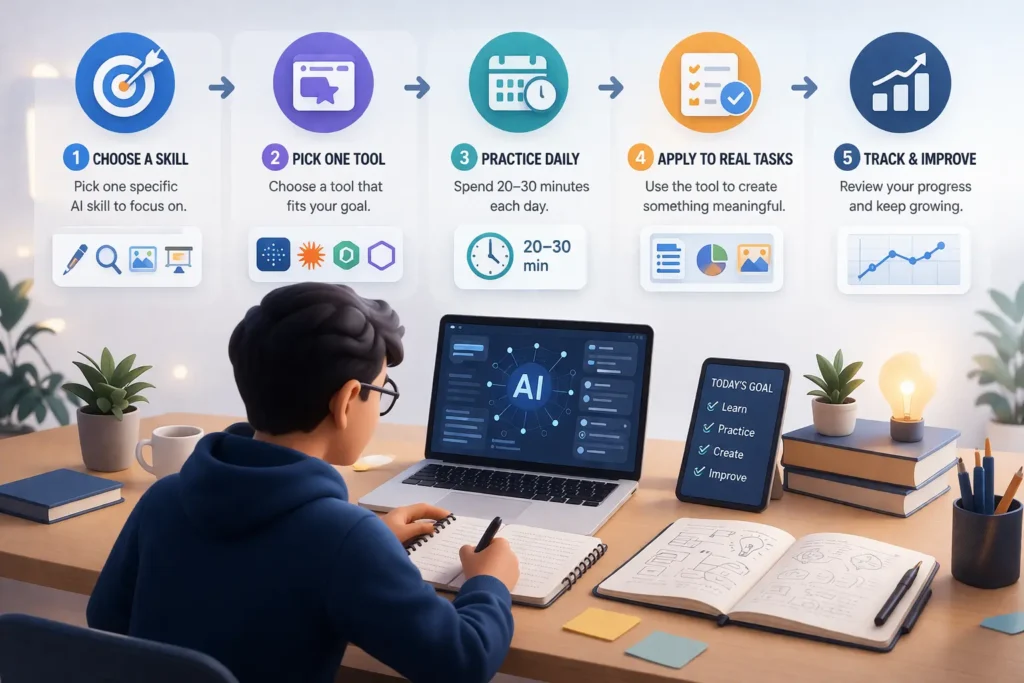
- Choose one specific skill you want to develop first. Examples include AI-assisted writing, research using AI, image generation, or building presentations. Narrow focus beats broad ambiguity every single time.
- Pick one tool from the list above that directly matches your chosen skill. Do not sign up for all seven tools on day one. Choose one and commit to it for at least one full week before expanding.
- Practice daily for a minimum of 20 to 30 minutes. Short, consistent sessions build understanding far faster than one long weekend session. Treat it like going to the gym — frequency matters more than duration.
- Apply what you learn to a real, meaningful task. Use the tool to complete something that actually matters to you — a blog post, a research summary, a presentation, a visual asset. Real output forces you to problem-solve and improve.
- Track your progress at the end of every week. Write down what you created, what worked well, what confused you, and what you want to try next. This simple habit significantly accelerates your growth with free AI tools for beginners to learn AI skills faster.
Following this process consistently, most beginners start feeling genuinely confident with at least one AI tool within two to three weeks.
Common Mistakes Beginners Make While Learning AI
Learning AI is exciting — but there are a few traps that slow down most beginners. Being aware of them in advance puts you well ahead.
Jumping between too many tools too quickly: Trying five different tools in your first week means you never go deep enough with any single one. Stick with one tool until you feel truly comfortable before adding another.
Watching tutorials instead of actually using the tools: Video tutorials create a comfortable illusion of progress. Real learning only happens when you open the tool yourself and start experimenting. Doing beats watching every time.
Expecting instant results without real practice: AI tools are powerful, but using them well takes genuine practice. Give yourself permission to produce poor outputs in the beginning. That is a completely normal part of the learning process.
Not practicing with real-world tasks: Random test prompts are fine for the very beginning, but actual skill comes from using AI to complete real projects. Write a real article. Build a real presentation. Research a real question that matters to you.
Ignoring prompt quality entirely: Poor prompts produce poor results, regardless of how good the tool is. Learning to communicate clearly and specifically with AI is the single most important skill you can build early. Tools like FlowGPT exist precisely to help beginners develop this skill.
Pro Tips to Learn AI Skills Faster with Free AI Tools
These tips come directly from real experience and will genuinely accelerate your progress with free AI tools for beginners to learn AI skills faster.
Focus on one skill at a time: Choosing one area and becoming genuinely good at it is far more valuable than having surface-level knowledge of ten different skills. Pick writing, research, or design — and master that before expanding.
Learn prompting before anything else: The quality of every output you get from any AI tool depends almost entirely on how well you communicate your request. Spend dedicated time practicing different prompt structures and keep a personal library of prompts that consistently produce great results.
Learn by doing, not just studying: Open the tool. Type a prompt. Review the output. Adjust your approach. Try again. This loop — prompt, review, refine — is the fastest path to building real competence with free AI tools for beginners to learn AI skills faster.
Stay current with trends and updates: AI tools evolve extremely fast. Following authoritative blogs like Ahrefs at https://ahrefs.com/blog and monitoring Google Trends at https://trends.google.com will help you understand which AI skills are most in demand and where the industry is heading.
Teach what you learn to others: After picking up something new, try explaining it to a friend or writing a short summary about it. Teaching forces a deeper level of understanding than simply consuming information.
Connect your skills to real opportunities: As your confidence grows, start exploring how your AI skills can create real value. Look into how to make money with AI tools for beginners, investigate free AI tools for affiliate marketing, and consider building a presence through free AI tools for starting a blog.
Frequently Asked Questions
Here are common questions about free AI tools for beginners to learn AI skills faster.
Can I learn AI without any coding knowledge?
Yes, absolutely. Every tool in this guide was designed for non-technical users. Perplexity, Claude, Gamma, Leonardo, and the others all use plain language interfaces. You type what you want and the tool handles all the technical complexity. Coding is a useful bonus skill but is not required to get started or to reach an intermediate level.
Which free AI tool is best for complete beginners?
For most beginners, Claude AI or Perplexity AI is the best starting point because both are conversational, forgiving, and excellent at explaining things clearly. Once you feel comfortable with those, expand into tools like Gamma for presentations, Leonardo for images, or Elicit for academic research.
How long does it take to learn AI skills?
With consistent daily practice of 20 to 30 minutes, most beginners feel genuinely confident with one or two tools within two to four weeks. Building broader AI skills across multiple tools typically takes two to three months of regular, applied practice. Consistency matters far more than natural ability.
Are free AI tools enough to learn seriously?
Yes. The free plans of Perplexity, Claude, Gamma, Elicit, Leonardo, Tome, and FlowGPT collectively provide more than enough capability to develop real, marketable AI skills. You do not need to invest in paid plans until you know exactly which premium features are worth the cost for your specific goals.
What AI skills are most valuable in 2026?
Prompt engineering, AI-assisted writing and content creation, AI-powered research, and AI image generation are among the most in-demand skills right now. Also worth exploring are free AI tools for keyword research and SEO, free AI tools for video editing, and free AI tools for faceless YouTube videos without credit card — all growing areas where AI is creating real career and income opportunities.
Can students use these free AI tools for school and assignments?
Yes. Tools like Elicit for academic research, Gamma for presentations, and Perplexity for studying new topics are used widely by students at all levels. They help with essays, research papers, project presentations, and rapidly learning new subjects. All of them offer generous free plans that work well for student budgets.
Related Articles
- Free AI Tools for Content Creation
- Free AI Tools for Keyword Research and SEO
- Free AI Tools for Starting a Blog
- Free AI Tools for Affiliate Marketing
- Free AI Tools for Video Editing
Conclusion
Learning AI in 2026 does not require money, a technical background, or years of study. It requires the right tools, a consistent daily habit, and the willingness to apply what you learn to real tasks.
The free AI tools for beginners to learn AI skills faster covered in this guide — Perplexity, Claude, Gamma, Tome, Elicit, Leonardo, and FlowGPT — each give you a genuine, practical entry point into the world of artificial intelligence. Together, they cover research, writing, design, visual storytelling, prompt engineering, and deep learning of concepts.
Start with one tool. Practice for 20 minutes today. Apply it to something real. Then do it again tomorrow.
As your skills grow, explore adjacent opportunities like free AI tools for voice cloning without credit card, free AI tools for faceless YouTube videos without credit card, and broader questions like what are AI tools and how they are reshaping work and creativity across every industry.
This is exactly how free AI tools for beginners to learn AI skills faster can transform your learning journey in 2026 — not through shortcuts or hype, but through consistent, practical, daily use of the right tools at the right time.
The best moment to start using free AI tools for beginners to learn AI skills faster was a year ago. The second-best moment is right now.
Open a tool. Type your first prompt. That single action is where every AI success story begins.
