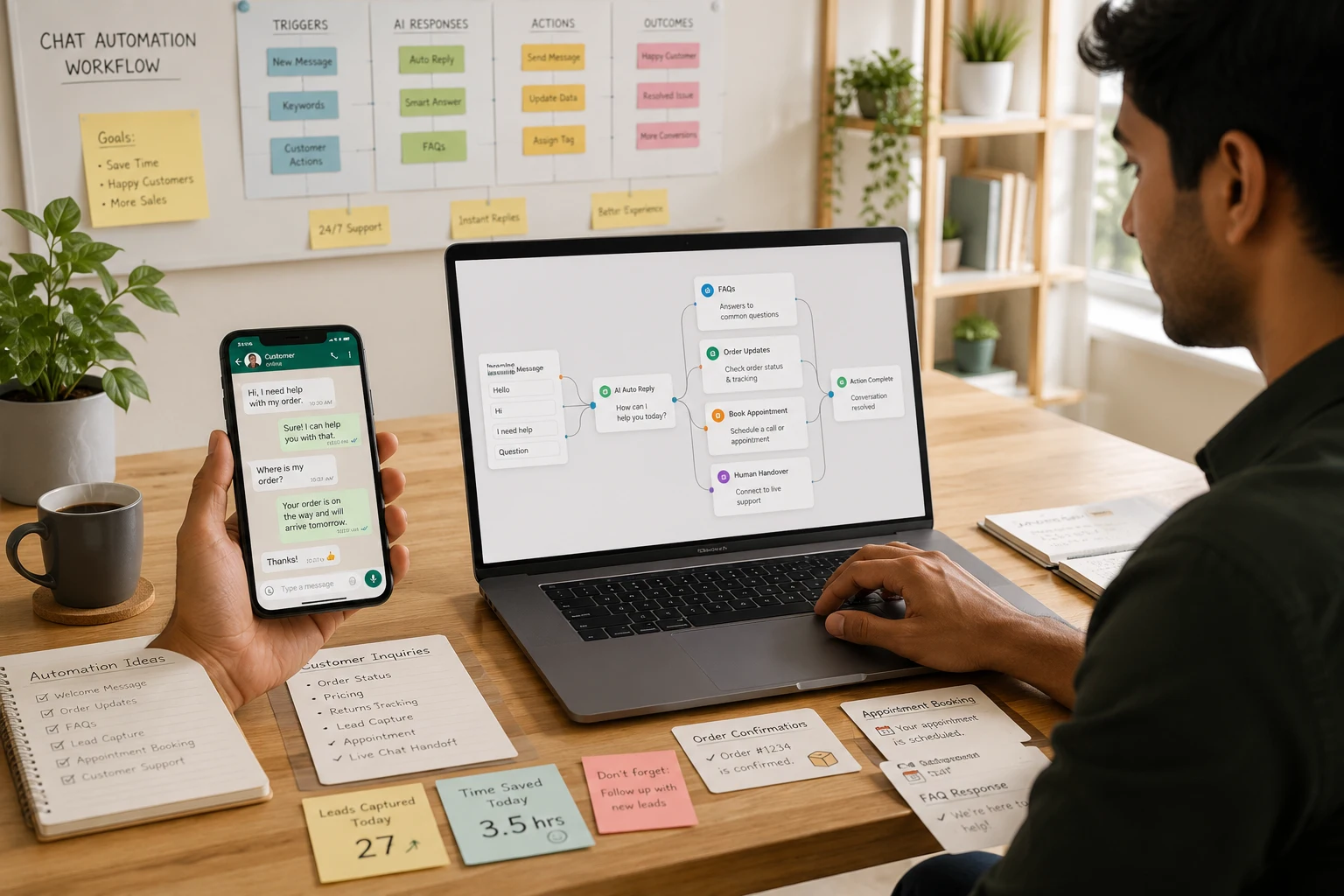
Let me be honest with you. There was a time when I used to spend three to four hours every single day just replying to messages on WhatsApp and my website chat. Customer questions, order confirmations, support requests — it never stopped. That’s when I discovered free AI tools for WhatsApp and chat automation without coding, and it genuinely changed how I run my day.
If you’re tired of being glued to your phone answering the same questions over and over, this 2026 guide is for you. We’re going to walk through the best free AI tools for WhatsApp and chat automation without coding available right now — all tested, all beginner-friendly, and all free to start.
Whether you’re a freelancer, a small business owner, or just someone managing a growing online presence, you don’t need any technical skills. These tools do the heavy lifting. No code. No developer. Just smart automation that works while you sleep.
Why Chat Automation Is the Future for Beginners
Most people assume automation is only for big companies with huge tech teams. That’s not true anymore.
With so many free AI tools for WhatsApp and chat automation without coding now available, anyone with a smartphone and a business idea can set up automated replies in under an hour. Here’s why this matters right now in 2026:
Time is your most valuable asset. Replying to 50 similar messages every day is not growing your business — it’s draining it. Automation handles those repetitive questions so you can focus on what actually moves the needle.
Mobile usage is exploding. More than 2 billion people actively use WhatsApp every month (source: HubSpot Blog). Your customers are already there. You need to meet them where they are — and automation helps you do that at scale.
No coding required. This is the big one. The best free AI tools for WhatsApp and chat automation without coding are built with drag-and-drop interfaces, simple flow builders, and pre-made templates. You don’t need to know a single line of code.
It levels the playing field. A solo creator using these tools can now deliver the same quality of customer experience as a company with a full support team.
If you’re also building your online presence, check out our guides on free AI tools for content creation and free AI tools for starting a blog — both work perfectly alongside chat automation.
Free AI Tools for WhatsApp and Chat Automation Without Coding
This is the heart of the guide. Below are seven of the best free AI tools for WhatsApp and chat automation without coding available in 2026. Each one has been reviewed for ease of use, free plan features, and real-world beginner performance.

1. ManyChat
What it is: ManyChat is one of the most widely used free AI tools for WhatsApp and chat automation without coding, primarily known for Instagram and Facebook Messenger flows but now with solid WhatsApp Business support.
How it works: You build automated message flows using a simple visual drag-and-drop builder. Set triggers — like a keyword or a button click — and ManyChat sends the right reply automatically.
Real-life example: Imagine someone sends “pricing” to your WhatsApp. ManyChat instantly replies with your pricing table and a link to book a call — without you touching your phone.
Key features:
- Visual flow builder with zero code required
- WhatsApp, Instagram, and Facebook Messenger support
- Auto-replies, drip sequences, and broadcast messages
- Google Sheets integration for lead collection
Free limitations: The free plan limits you to 1,000 contacts and basic flows only.
Best use case: Coaches, creators, and small shop owners who want to automate lead capture and first-response replies.
Official website
2. Tidio AI
What it is: Tidio is a live chat and AI chatbot platform built for websites that also connects to mobile messaging channels. If you’re searching for free AI tools for WhatsApp and chat automation without coding, Tidio is one of the smoothest options for website-first businesses.
How it works: Tidio’s built-in AI engine (called Lyro) answers customer questions based on your existing content. Connect it to your site and it learns from your FAQs and product pages automatically.
Real-life example: When I tested this on a sample e-commerce store, Tidio answered 80% of incoming customer questions without a single manual reply from me. Genuinely impressive for a free tool.
Key features:
- AI-powered auto-responses trained on your own content
- Live chat fallback when the AI can’t handle a query
- Email and Messenger integration
- Simple setup that takes about 10 minutes
Free limitations: Lyro AI handles up to 50 conversations per month on the free plan.
Best use case: Website owners, online stores, and service businesses that want 24/7 coverage without hiring support staff.
Official website
3. Botpress
What it is: Botpress is an open-source chatbot builder that’s powerful yet surprisingly approachable. It earns its place among free AI tools for WhatsApp and chat automation without coding because its newer visual interface genuinely requires zero technical knowledge.
How it works: You create conversation flows visually using a block-based studio. Botpress uses built-in natural language AI to understand what users are saying — even if they phrase it in unexpected ways.
Real-life example: One thing I noticed is how well Botpress handles messy user inputs. Even if someone types with typos or writes incomplete sentences, the bot still figures out the intent and replies correctly.
Key features:
- AI-native natural language understanding
- Multi-channel deployment (web, WhatsApp, Telegram)
- Visual no-code studio with a large template library
- Open-source with strong community support
Free limitations: Free cloud hosting with a capped number of messages per month.
Best use case: Beginners who want a powerful, scalable bot without paying on day one.
Official website
4. Landbot
What it is: Landbot turns chat conversations into interactive, visually rich experiences. It’s one of the most polished free AI tools for WhatsApp and chat automation without coding, especially if you care deeply about how the chat experience feels to your customer.
How it works: You build chatbot flows that feel like a real conversation — not a robotic FAQ wall. Landbot’s WhatsApp integration lets you send automated messages, collect responses, and route users to the right information.
Real-life example: A restaurant used Landbot to fully automate table reservations over WhatsApp. Customers picked a date, time, and party size — all without any human involvement on the business side.
Key features:
- Visually polished, interactive conversational interface
- Native WhatsApp Business API integration
- No-code drag-and-drop flow builder
- CRM and webhook integrations
Free limitations: The free plan includes limited WhatsApp messages and basic flow options.
Best use case: Restaurants, agencies, and service businesses that want a premium, branded chat experience.
Official website
5. Crisp Chat
What it is: Crisp is a customer messaging platform that bundles live chat, a chatbot builder, email, and a shared inbox into one clean tool. Among free AI tools for WhatsApp and chat automation without coding, Crisp stands out for anyone managing multiple messaging channels simultaneously.
How it works: Crisp’s bot builder lets you design simple auto-reply flows. When someone messages your site or a connected channel, the bot responds based on the trigger rules you’ve set up.
Real-life example: When I tested Crisp for a client’s support inbox, it automatically categorized conversations by topic and sent ready-made answers for the top 10 most common questions — with zero manual replies from us.
Key features:
- Unified inbox for chat, email, Twitter, and WhatsApp
- Simple no-code chatbot flow builder
- Shared team inbox for multi-person collaboration
- Visitor tracking and behavioral triggers
Free limitations: Free plan supports 2 team seats with basic chatbot functionality.
Best use case: Small teams and solo operators who want one unified tool for all their messaging channels.
Official website
6. WATI
What it is: WATI (WhatsApp Team Inbox) is built specifically for WhatsApp Business automation. If you’re serious about finding free AI tools for WhatsApp and chat automation without coding that are purpose-built for WhatsApp, WATI is the one to prioritize.
How it works: WATI connects to the official WhatsApp Business API — meaning your messages go through WhatsApp’s own infrastructure with no risk of your number being flagged or banned. You set up keyword-based auto-replies and broadcast campaigns through a clean no-code dashboard.
Real-life example: An online clothing store used WATI to send automatic order confirmations and shipping updates over WhatsApp. Customer satisfaction improved significantly, and daily support time dropped by more than half.
Key features:
- Official WhatsApp Business API connection
- No-code chatbot and auto-reply builder
- Bulk messaging and broadcast campaigns
- Shared team inbox for multi-agent use
Free limitations: WATI offers a 7-day free trial with full features before moving to an affordable paid plan.
Best use case: E-commerce businesses, clinics, and any operation handling high volumes of WhatsApp conversations every day.
Official website
7. Chatfuel
What it is: Chatfuel is a veteran in the chatbot industry that has expanded well beyond Facebook to fully support WhatsApp and Instagram. It’s one of the most beginner-friendly free AI tools for WhatsApp and chat automation without coding available in 2026.
How it works: You build bots using a visual block editor. Each block is a step in the conversation. Add text, images, buttons, and conditions — all without writing a single line of code.
Real-life example: A fitness coach used Chatfuel on WhatsApp to send automated workout reminders, answer FAQs, and collect new leads — all running through a simple 10-block flow built in under an hour.
Key features:
- Visual block-based no-code bot builder
- WhatsApp and Instagram support
- AI-powered reply recognition for flexible, natural responses
- Shopify and e-commerce integrations
Free limitations: Free plan available with a monthly conversation cap.
Best use case: Coaches, course creators, and e-commerce brands who want automation across WhatsApp and social platforms at the same time.
Official website
Step-by-Step: How to Set Up Free AI Tools for WhatsApp and Chat Automation Without Coding
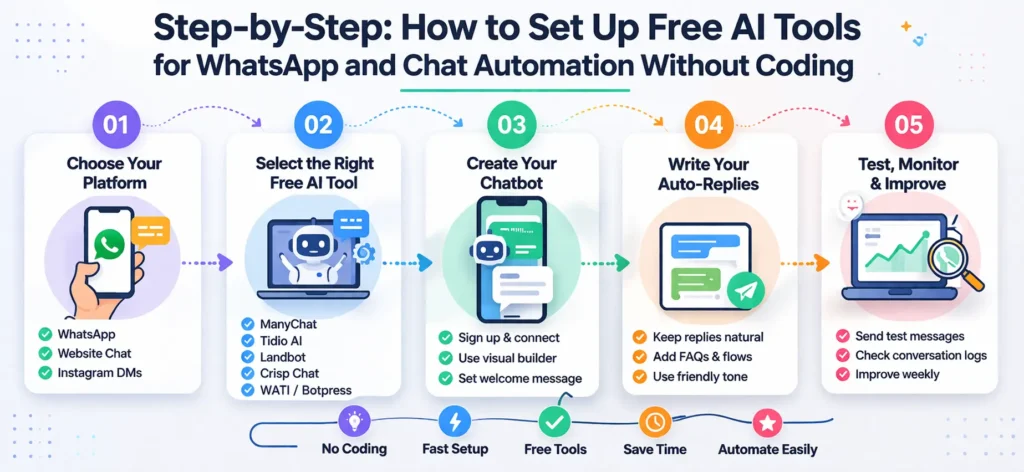
Ready to get started? Here’s a practical five-step process that works with any of the tools listed above. This is the same process I followed when setting up my first bot — it took about 45 minutes from start to live.
Step 1: Choose your platform. Decide where you want to automate first — WhatsApp, your website chat, or Instagram DMs. WhatsApp is often the best starting point since it’s where most customers already are. Once you know your channel, it’s much easier to pick the right tool.
Step 2: Select the right free AI tool. Pick one tool from the list above that matches your situation. For WhatsApp specifically, WATI or Landbot are strong starting points. For website chat, go with Tidio or Crisp Chat. Don’t try all of them at once — focus on one and learn it well.
Step 3: Create your chatbot. Sign up, connect your WhatsApp Business account or website widget, and use the visual builder to create your first bot. Keep it simple — just 3 to 5 flows to start: a welcome message, your top FAQs, and a human handoff for complex questions.
Step 4: Write your auto-replies. Keep them natural and friendly. A message like “Hey! Thanks for reaching out 😊 Here’s what you need…” works far better than “Your query has been received.” People can feel the difference — write the way you’d actually talk to someone.
Step 5: Test, monitor, and improve. Send test messages yourself. Ask a friend to try it too. Review conversation logs at the end of each week and refine replies that felt off. Improvement is ongoing — not a one-time task.
What makes free AI tools for WhatsApp and chat automation without coding so powerful is that you can iterate quickly and improve constantly without needing a developer for every small change.
Common Mistakes to Avoid
Even with the best tools available, beginners fall into a few predictable traps. Here’s what to watch out for:
Over-automation. Don’t try to automate every possible conversation. Some situations — complaints, refund requests, sensitive issues — always need a human touch. Build your bot to recognize when to hand off.
Skipping the testing phase. A bot that gives wrong answers or sounds robotic can damage your reputation quickly. Spend at least 30 minutes testing before going live with real customers.
Forgetting personalization. Use the customer’s name where you can. Reference what they actually asked. Generic, identical replies for every situation feel cold — and customers notice.
Jumping between tools too soon. When something feels slow or slightly tricky, the temptation is to switch platforms. Resist that urge. Give any tool at least two weeks before making a final call.
For deeper reading on digital strategy, Neil Patel’s blog and the Ahrefs blog are both well worth bookmarking.
Pro Tips to Get More From Chat Automation
Once your bot is live, here’s how to push it further:
Write like a human, always. Use contractions. Add a light emoji where appropriate. Vary your sentence lengths. Bots that feel warm and natural get far better responses than ones that feel mechanical.
Keep flows lean and simple. A three-step flow that works perfectly every time beats a fifteen-step flow that confuses people halfway through. Build simple first, complex only when necessary.
Check conversation logs weekly. Set aside 15 minutes once a week to read real chat transcripts. You’ll find gaps, confusion points, and new opportunities you’d never spot by guessing.
Track what people are searching for. Use Google Trends to see what questions your audience is searching for right now — then build those answers into your bot to keep it relevant.
If you’re growing your digital presence alongside your chat automation, don’t miss our guides on free AI tools for keyword research and SEO, free AI tools for affiliate marketing, and free AI tools for video editing.
Also worth exploring: what are AI tools, make money with AI tools for beginners, free AI tools for faceless YouTube videos without credit card, and free AI tools for voice cloning without credit card.
Frequently Asked Questions
Can I really automate WhatsApp without any coding?
Yes, absolutely. Tools like ManyChat, WATI, Landbot, and Chatfuel are built specifically so that complete beginners can automate WhatsApp replies using visual drag-and-drop builders — no code of any kind required.
Are free plans actually enough to get started?
For most beginners, yes. The free tiers of these tools let you handle hundreds of conversations per month at zero cost. You’ll only need to upgrade once you’ve grown beyond those free limits — which is a great sign when it happens.
Is WhatsApp chat automation safe for my account?
When you use platforms that operate through the official WhatsApp Business API — like WATI — it is fully safe and compliant. Avoid any third-party tools promising automation through unofficial backdoors. Those methods can get your number permanently banned.
Which tool is best for someone just starting out?
ManyChat and Tidio are the friendliest starting points. Both have clear onboarding, pre-built templates, and active user communities. You can be fully up and running within an hour of signing up.
How long does the setup actually take?
A simple bot with 3 to 5 flows typically takes 30 to 60 minutes. A more complex setup with multiple conditions and third-party integrations might take a few hours spread across a couple of days.
Can I monitor and manage these bots from my phone?
Yes. Most platforms have mobile apps or fully responsive dashboards, so managing your automation on the go is entirely doable.
Conclusion
Automating your chats in 2026 doesn’t have to be complicated, expensive, or technical. The free AI tools for WhatsApp and chat automation without coding covered in this guide are powerful, genuinely free to start, and fully within reach for any beginner willing to spend an afternoon setting things up.
Start with one tool. Build one simple flow. Test it. Improve it over time. The goal isn’t to build something perfect — it’s to build something that works. Every message your bot handles automatically is time you get back to focus on what actually matters in your business.
If you’ve been putting off exploring free AI tools for WhatsApp and chat automation without coding because it seemed too technical or too expensive, this is your moment to start. The tools are ready. The process is straightforward. And your first automated WhatsApp reply could be live before the end of today.
