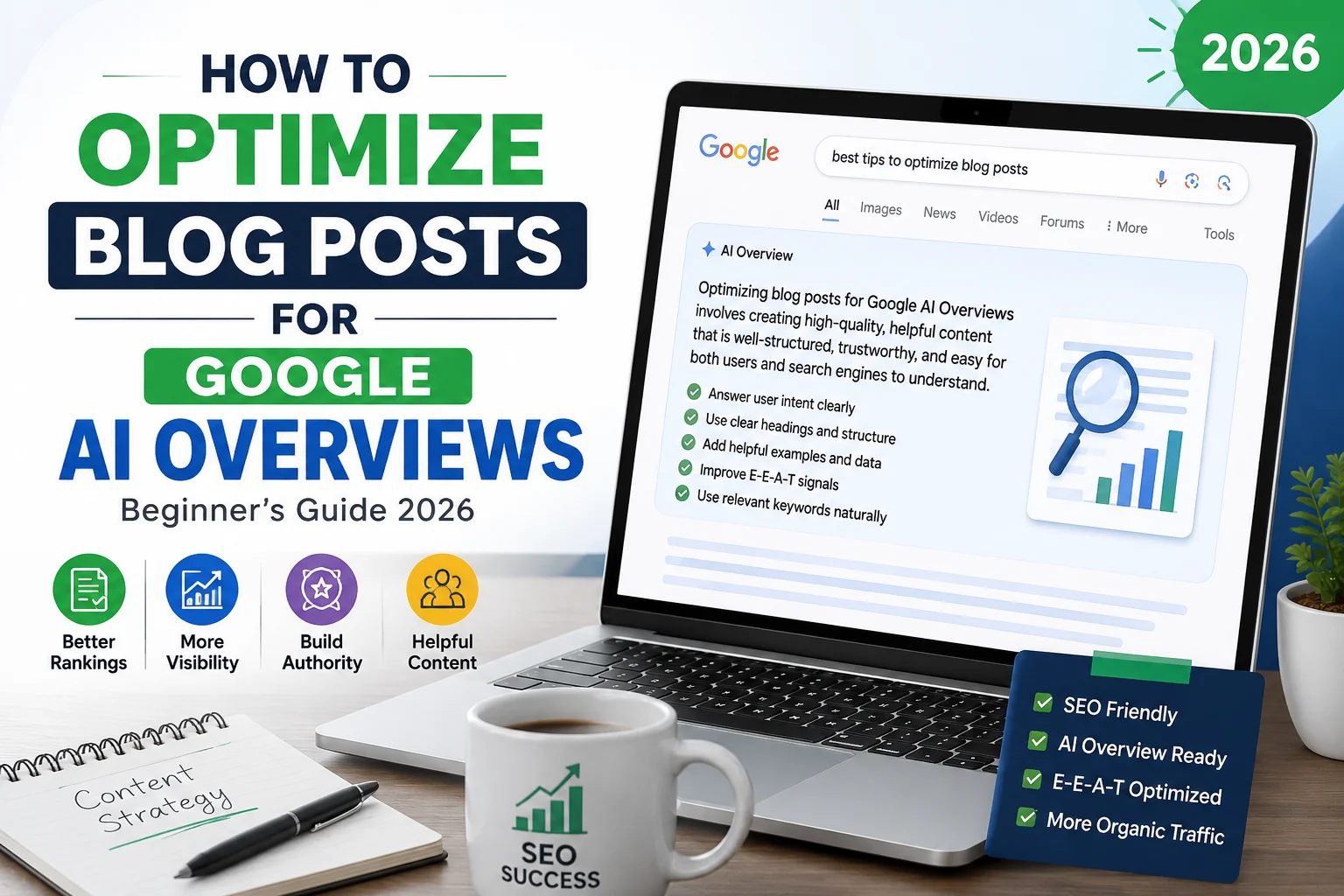
If you’re wondering how to optimize blog posts for Google AI Overviews, you’re not alone. Since Google introduced AI Overviews, many bloggers have noticed changes in rankings, organic traffic, and click-through rates. The good news is that you don’t need to rewrite your entire website. By following the right SEO strategies, you can optimize your content for Google AI Overviews and increase your chances of being featured.
In this guide, you’ll learn how to optimize blog posts for Google AI Overviews using beginner-friendly SEO techniques, EEAT best practices, structured content, and proven optimization methods that work in 2026.
Understanding Google AI Overviews
I explain what Google AI Overviews do, how they change result pages, and the specific signals Google uses to choose and summarize sources. Read the examples and priorities here so you can shape blog content that stands a real chance of being cited.
What Are AI Overviews and How They Work
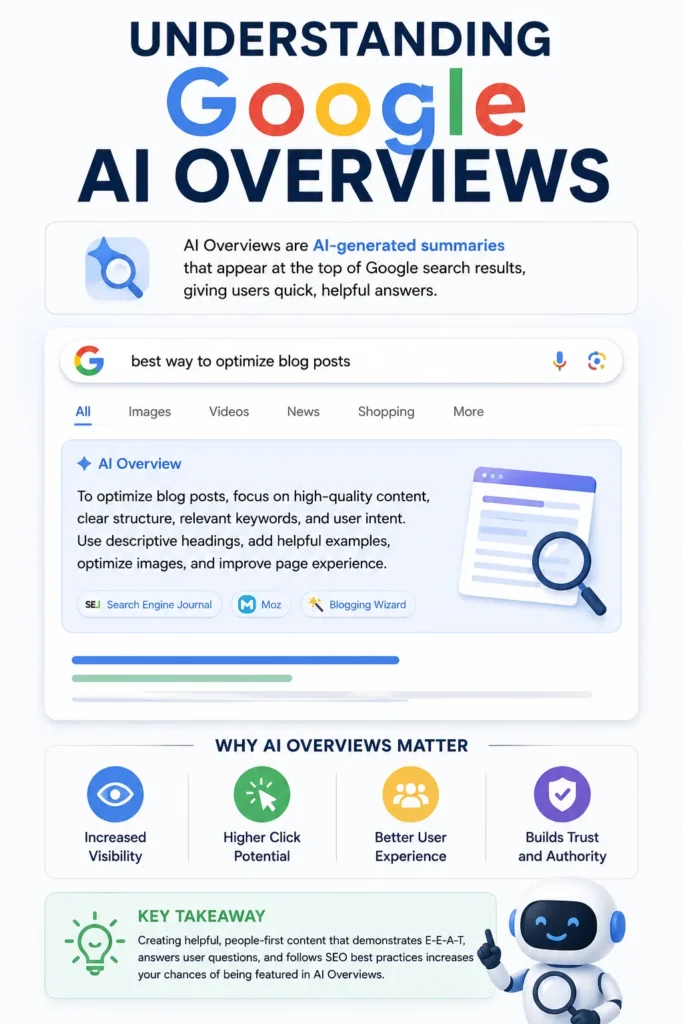
AI Overviews are concise, AI-generated summaries that appear on Google Search to answer queries quickly. I view them as synthesized responses built from multiple web sources rather than a single featured snippet.
They typically include a short paragraph or bullet list, followed by citations and links that users can open. The system extracts factual claims, ranks candidate sources by relevance and reliability, then composes a neutral summary that aims to satisfy the query intent.
I watch for patterns: direct-answer phrasing, clear structure (headings, lists, short paragraphs), and explicit factual statements increase the chance of being parsed and cited. Structured data like FAQPage schema and clear author/credential markup also help the system identify trustworthy passages.
How AI Overviews Influence Search Engine Results
AI Overviews occupy prominent real estate on the search results page and can reduce clicks to traditional organic results for queries answered fully in the overview. I optimize for visibility by prioritizing snippet-ready content and making key facts immediately scannable.
Traffic attribution can blur because Search Console groups AI Overview impressions under Web search type, not as a separate metric. I therefore track citation occurrences manually (searching sample queries), monitor organic click-through rates, and watch ranking shifts for pages that provide direct answers.
Local and commercial queries may show recommendations or agency listings within the overview, so I treat local signals—business profiles, reviews, and region-specific content—as primary optimization levers when relevant.
The Criteria Google Uses for Summarization
Google prioritizes several measurable signals when building AI Overviews: relevance to query intent, explicitness of answers, E-E-A-T (Experience, Expertise, Authoritativeness, Trustworthiness), and source diversity. I focus on satisfying each signal in the content I publish.
Specifics matter: factual, verifiable claims with citations, clear authorship, and first-hand experience examples increase E-E-A-T. I structure content with short declarative sentences, use schema where appropriate, and include provenance (dates, data sources, methodologies) so extraction models can confidently cite my page.
Technical hygiene matters too: mobile-friendly pages, fast load times, and accessible HTML structure help the crawler and the summarization model read and extract passages accurately.
Essential Content Structure
I focus on structuring content so AI can find, extract, and cite precise answers quickly. Clear headlines, logical ordering, and readable blocks increase the chance a passage gets used in Google AI Overviews.
Crafting Clear Headlines and Subheadings
I write headlines that state the exact intent of the section in 6–10 words when possible. Use action-oriented verbs and include the primary target phrase early (e.g., “How to Resize Images for Web Performance”), so both humans and models see the topic immediately.
Use H1 for page title, H2 for major sections, and H3/H4 only for nested subpoints. Keep each subheading focused on one idea and avoid ambiguous words like “things” or “tips.”
I bold or italicize critical terms inside sections to signal importance, and I include one-sentence summaries under complex H2s to preview the answer.
Example pattern I use:
- H2: Question or goal
- Short answer (1 sentence)
- H3/H4: Steps, exceptions, examples
Organizing Information for Maximum Clarity
I chunk content into answer-first blocks: state the concise answer, then list evidence and steps. This helps extractors pick the summary without reading the whole post.
I use numbered lists for processes and bulleted lists for attributes or checks. Each list item stays to 10–18 words and covers a single concept.
I place schema-friendly FAQ entries near the end of articles and link each FAQ back to a more detailed section. Internal links use descriptive anchor text (not “click here”) to reinforce topical context for AI.
I also maintain topical clusters: one canonical article per core topic and shorter, tightly focused posts for subtopics. That internal hierarchy helps AI identify the best-cited source.
Enhancing Readability for AI Comprehension
I keep paragraphs to 1–3 sentences and sentences mostly under 20–25 words to match how models parse tokens. Short, declarative sentences reduce ambiguity and improve extractability.
I include a concise 15–30 word summary at the top of each H2 to present an explicit answer. Tables work well for comparing options or showing step parameters; I keep them to 3–6 rows so the table remains easily digestible.
I avoid jargon unless I define it in a parenthetical or a one-line glossary. I also add micro-formatting cues—bold key figures, use code blocks for command examples, and include exact values (percentages, filenames, commands) so AI can cite concrete details.
Targeted Keyword Integration
I focus on choosing precise keywords, placing them where AI and users expect them, and keeping language natural so generative systems can cite my content reliably.
Selecting Main and Related Keywords
I pick one clear primary keyword that matches search intent, such as “optimize blog for Google AI Overviews” or “Google AI Overview optimization.”
I validate that choice with search volume, intent signals, and competitor snippets. Use tools for related entities and questions to find 6–12 supporting keywords: short phrases, long-tail queries, and named entities (e.g., “AI Overviews,” “structured answers,” “schema for AIOs”).
I prioritize keywords that appear in existing AI summaries and Q&A boxes.
I map each related keyword to a single section or paragraph to avoid keyword cannibalization.
I keep a small spreadsheet with columns: Keyword, Intent, Target URL, Primary Placement, and Notes.
Optimizing Placement for Relevance
I place the primary keyword in the title, an H1 or near it, and within the first 50–100 words of the introduction.
I add the keyword to one H2 or H3 header that directly answers the core query.
I use placement signals favored by AI overviews:
- Lead sentence that contains the keyword and a concise definition.
- Short, direct answers (1–2 sentences) following question-style subheaders.
- Structured elements (bullet lists, numbered steps, tables) near keyword occurrences.
I also include the primary keyword in meta title and descriptive meta elements.
For technical pages, I add schema (FAQ, Article) with concise answers that echo on-page phrasing.
Balancing Keyword Density with Natural Flow
I aim for natural frequency over a fixed percentage.
I let the primary keyword appear where it reads best: headline, intro, one or two subheads, and 2–4 body occurrences depending on length.
I avoid stuffing by rewriting sentences to use related terms and synonyms.
I use entity-rich phrasing rather than repeating exact strings; for example, swap “AI Overviews” with “Google generative summaries” or “AIO citations” where appropriate.
I scan for readability and use short paragraphs and lists to break up repeated terms.
I run a final pass to ensure every keyword occurrence adds meaning; if any instance feels forced, I remove or rephrase it.
Leveraging Semantic SEO
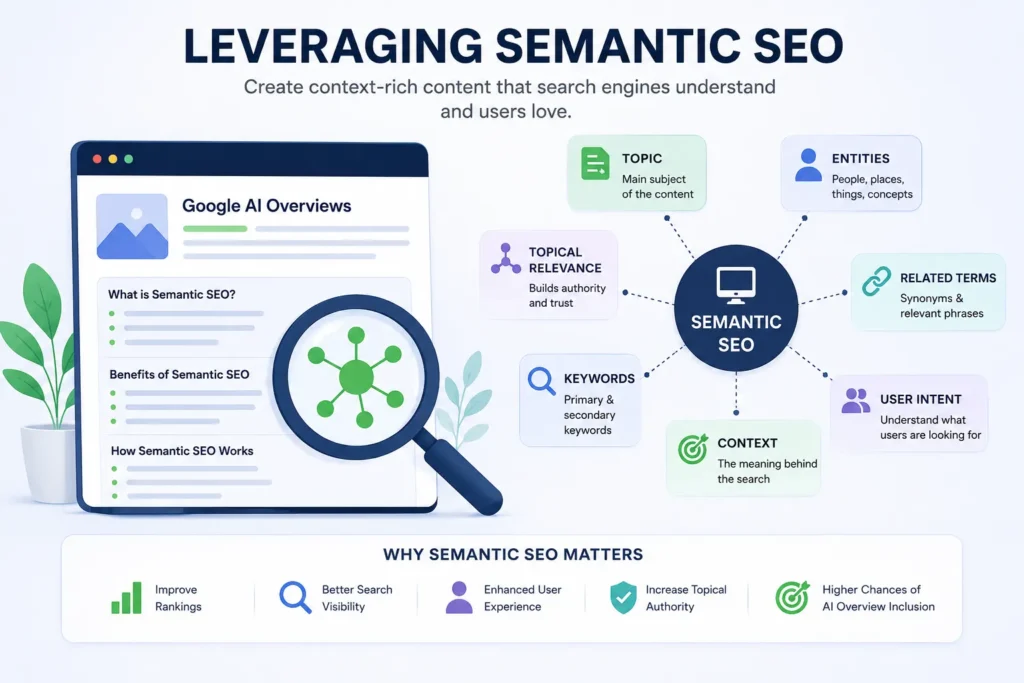
I focus on meaning, not just keywords, to help search engines and generative models understand a post’s purpose. Implement named entities, related phrases, and clear content structure so AI can extract concise answers and cite your page.
Using Contextual Synonyms and Entities
I map core terms to their contextual synonyms and entities so content reads naturally and signals relevance to AI. For example, a post about “electric vehicle charging” should also include phrases like EV charger, Level 2 charging, charging station network, and entities such as Tesla Supercharger or CHAdeMO where accurate.
I use a mix of techniques:
- Add bolded primary terms in headings and first paragraph for emphasis.
- Provide inline clarifications (e.g., “Level 2 — 240V home chargers”) to disambiguate.
- Include a short bullet list of closely related entities or models when relevant.
These steps increase embedding coverage for models and improve cosine-similarity matches that AI overviews use to select authoritative snippets.
Addressing User Intent in Content
I identify the likely intent—informational, transactional, or navigational—and lead with the direct answer. For an informational query, I state the key fact or recommendation in the first 1–2 sentences, then expand with examples, numbers, or steps.
I write distinct micro-sections that mirror user prompts: “How long does Level 2 charging take?” followed by a concise answer and a short table or bullets with time estimates by battery size.
- Use headers that match search queries.
- Provide concrete data, sources, and time/price ranges.
- Avoid fluff; every sentence must help resolve the user’s question.
This practice aligns content with AI overview heuristics that prefer direct answers plus immediate supporting context.
Structuring Content Around Topical Clusters
I organize posts into topical clusters that connect a pillar page with linked subtopics. The pillar covers broad concepts; cluster pages dive into specifics like installation, costs, and maintenance. Internal linking uses descriptive anchor text that repeats key entities and intents.
Practical layout:
- Pillar header with a clear definition and a short FAQ.
- H2s that reflect user queries and H3s for quick examples or steps.
- A simple table listing cluster pages and the exact questions they answer.
This structure builds topical authority and gives AI systems clear, interlinked signals to assemble comprehensive overviews and cite the most relevant page.
Incorporating Reliable Data and Sources
I prioritize clear evidence and creditable sourcing so Google can verify facts and trust my content. I focus on named experts, official reports, and precise figures that directly support each claim.
Citing Authoritative References
I link to primary sources such as peer-reviewed journals, government reports, official company statements, and recognized industry organizations. I prefer URLs that include publication dates and author names so Google and readers can assess recency and expertise quickly.
When I cite, I place the reference next to the specific claim and use an inline parenthetical or a short footnote-style link. This helps AI extractors identify which sentence the source supports.
I also call out my own original data or methods explicitly (e.g., “My survey of 423 marketers, conducted in March 2026…”). That signals first-hand experience and aids E-E-A-T.
For non-technical audiences, I add one-sentence context about why a source is reliable (e.g., “U.S. Census Bureau population estimates, 2024 — official government data”).
Including Statistics for Factual Support
I use precise numbers and narrow ranges rather than vague qualifiers like “many” or “most.” For example: “Conversion rate rose from 2.1% to 3.4% over six months (n=12,345 page views).” Short, specific stats allow AI Overviews to surface exact facts.
I always include the sample size, date range, and measurement method when I present a statistic. If a stat comes from another source, I show the source name and year immediately after the figure.
I format key stats as a short bulleted list when a paragraph would bury them. This improves scannability for both readers and AI:
- Conversion increase: 2.1% → 3.4% (Jan–Jun 2026, n=12,345)
- Bounce rate change: –7 percentage points (tracked via Google Analytics 4)
If a figure has important caveats, I state them in one sentence right after the number so the context stays attached.
Technical Enhancements for AI Recognition
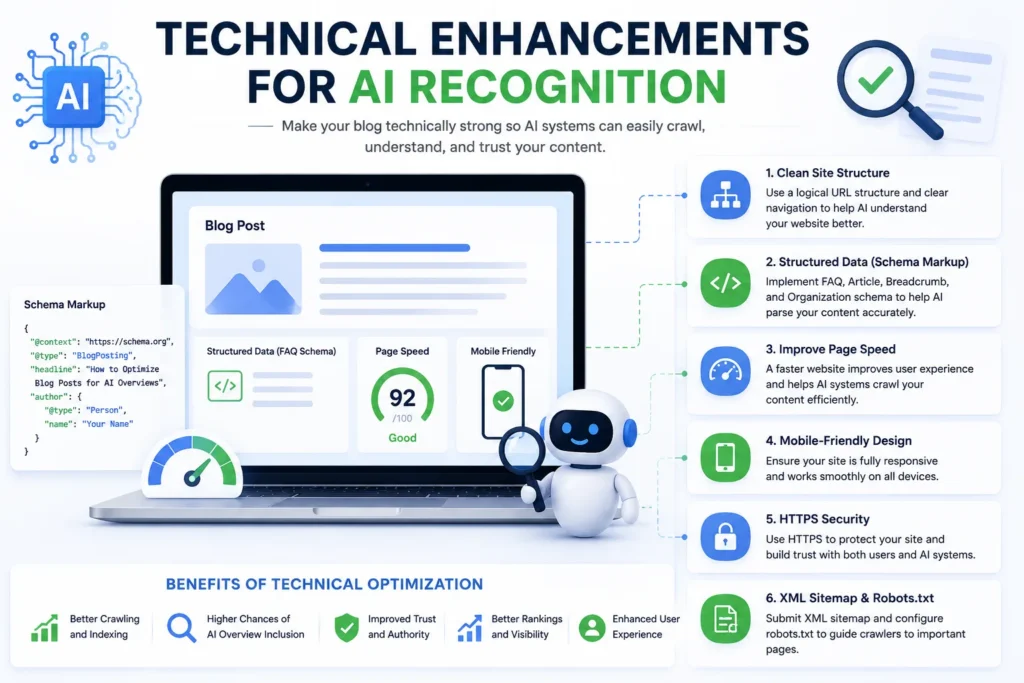
I focus on concrete technical changes that help Google’s AI detect, understand, and cite a blog post. These include precise metadata, structured data, fast delivery, and a mobile-first experience.
Optimizing Meta Tags and Schema Markup
I craft a concise, direct meta title (50–60 characters) and meta description (around 120–155 characters) that include the primary query phrase near the front. This helps AI extract a clear snippet and intent signal.
I implement Schema.org structured data relevant to the content type: Article, BlogPosting, FAQPage, and HowTo when appropriate. For each schema block I populate required properties: headline, author.name, datePublished, dateModified, description, and mainEntityOfPage.url. I include image objects with width/height where possible.
I add FAQ schema only when the Q&A is native to the page and mirrors visible content. I use JSON-LD placed in the head to avoid crawler parsing issues. I validate with Rich Results Test and the Schema Markup Validator to catch missing or conflicting fields.
Improving Site Speed and Mobile Experience
I measure performance with Real User Metrics (CLS, LCP, FID/INP) and Core Web Vitals, then prioritize reductions in Largest Contentful Paint and Cumulative Layout Shift. I serve images in AVIF/WebP, use responsive srcset, and lazy-load below-the-fold assets.
I enable server-side compression (Brotli), set long cache lifetimes for static assets, and implement critical CSS inlined for above-the-fold content. I audit third-party scripts and defer or async nonessential tags to reduce main-thread work.
I ensure responsive layouts with CSS grid/flex and touch-target sizing that meets accessibility guidelines. I test on mid-tier 4G and low-end devices using Lighthouse and field data in Search Console, then iterate on bottlenecks until mobile LCP and interaction metrics meet competitive thresholds.
Evaluating and Updating Existing Content
I prioritize measurable gaps and clear improvement tasks: find pages that underperform for targeted queries, check factual accuracy and update structure for snippet-ready answers, then track metrics to confirm impact.
Identifying Opportunities for Optimization
I start by exporting pages with steady traffic but declining impressions or lower click-through rates in Search Console.
I sort by queries containing target keywords or question phrases that map to potential AI Overview triggers (e.g., “how to…”, “best way to…”).
I flag pages with short, thin answers near the top of SERPs or those that lack structured data, clear headings, or concise summary bullets.
Next, I evaluate content quality against these criteria:
- Accuracy: update dates, facts, and statistics with reliable sources.
- Comprehensiveness: add short “quick answer” paragraphs (40–80 words) that directly address common questions.
- Structure: include an H2/H3 hierarchy, bulleted lists, and a 1–2 sentence lead that states the answer plainly.
- Markup: add FAQ schema, how-to schema, or other relevant structured data.
I then prioritize pages by potential impact: high impressions + low CTR first, followed by topic clusters with internal linking opportunities.
Frequently Asked Questions (FAQs)
1. What is Google AI Overviews?
Google AI Overviews is an AI-powered search feature that generates concise answers at the top of search results by summarizing information from multiple trusted sources. Websites with high-quality, well-structured, and authoritative content have a better chance of being referenced in AI Overviews.
2. How do I optimize blog posts for Google AI Overviews?
To optimize blog posts for Google AI Overviews, focus on creating helpful content that directly answers search intent. Use clear headings, concise paragraphs, question-and-answer sections, internal links, structured data, and demonstrate Experience, Expertise, Authoritativeness, and Trustworthiness (E-E-A-T).
3. Does Google AI Overviews replace traditional SEO?
No. Google AI Overviews does not replace traditional SEO. Strong on-page SEO, keyword research, technical optimization, page speed, mobile usability, and high-quality backlinks remain important ranking factors alongside AI-focused content optimization.
4. What type of content appears in Google AI Overviews?
Google AI Overviews usually highlights content that clearly answers user questions, explains topics in simple language, includes practical examples, and comes from trustworthy websites with strong topical authority.
5. Is E-E-A-T important for Google AI Overviews?
Yes. E-E-A-T (Experience, Expertise, Authoritativeness, and Trustworthiness) is one of the most important factors. Articles that demonstrate real experience, cite reliable sources, maintain factual accuracy, and include transparent author information are more likely to be trusted by Google.
6. Can a new blog rank in Google AI Overviews?
Yes. A new blog can appear in Google AI Overviews if it consistently publishes original, well-structured, and helpful content that satisfies user intent. While authority helps, high-quality content can still earn visibility over time.
7. Should I use AI to write content for Google AI Overviews?
AI can help with brainstorming, outlining, and drafting content, but every article should be reviewed, edited, fact-checked, and enhanced with original insights before publishing. Human expertise and accuracy are essential for long-term SEO success.
8. What are the best SEO practices for Google AI Overviews in 2026?
The best practices include answering user questions directly, using descriptive headings, optimizing for long-tail keywords, adding FAQ sections, improving page experience, implementing structured data where appropriate, building topical authority, and regularly updating older content.
9. How long does it take for optimized content to appear in Google AI Overviews?
There is no guaranteed timeline. Depending on crawling, indexing, competition, and content quality, it may take several weeks or months before Google considers a page for AI Overviews.
10. Can internal linking improve my chances of appearing in Google AI Overviews?
Yes. Internal linking helps Google understand your website’s topical authority and content relationships. Linking relevant articles together also improves user experience and can strengthen your overall SEO performance.
Monitoring Performance Through Analytics
I set up a baseline before making changes: record impressions, clicks, CTR, average position, and session engagement (time on page, bounce).
I use Search Console for query-level shifts and Google Analytics/GA4 for behavior signals.
After updates, I monitor weekly for 4–8 weeks.
I look for specific signals: a rise in impressions for targeted queries, improved CTR on SERP features, and longer average time on page.
If AI Overviews begin to cite the page, I document the exact excerpt and compare it to the “quick answer” I added.
If metrics don’t improve, I run A/B style tests by:
- Rewriting the lead answer vs. changing structured data.
- Testing variant headlines and question-form H2s.
I log every iteration and outcome so I can reproduce what worked across other posts.
Conclusion
As search continues to evolve, learning how to optimize blog posts for Google AI Overviews is no longer optional—it’s becoming an essential part of modern SEO. Google’s AI-powered search experience rewards content that is accurate, well-structured, trustworthy, and genuinely helpful to users.
Instead of focusing on keyword stuffing or outdated ranking tricks, prioritize creating content that answers real questions, demonstrates experience, and provides practical value. Organize your articles with clear headings, concise explanations, relevant examples, and helpful FAQs. Over time, these practices can improve both your organic rankings and your chances of being featured in Google AI Overviews.
Remember that SEO is a long-term strategy. Continue updating older articles, strengthen your internal linking, improve page experience, and publish high-quality content consistently. The more authority you build within your niche, the more likely Google is to recognize your website as a reliable source of information.
If you start implementing the strategies shared in this guide today, you’ll be better prepared for the future of AI-powered search and create content that benefits both your readers and your website’s long-term growth.
About the Author
Muhammad Nadeem is the founder and primary author of InfoCandle. He writes beginner-friendly guides about AI tools, blogging, SEO, digital productivity, and online business. His goal is to simplify complex technology into practical, step-by-step tutorials that help readers learn new skills, improve their workflow, and stay updated with the latest digital trends.
Related Articles
If you found this guide helpful, you may also like:
Found this guide helpful?
If this article helped you understand how to optimize blog posts for Google AI Overviews, consider sharing it with other bloggers, content creators, and website owners. As Google Search continues to evolve, staying informed and regularly improving your content strategy will help you achieve sustainable organic growth.
